Guide · Computer vision
Running YOLO on a Jetson: ONNX and TensorRT in Practice
Key takeaways
- Export to ONNX first; build the TensorRT engine on the target device, not your workstation.
- Validate quality at each precision; reduced precision can change detections.
- Engine files are device- and version-specific — rebuild, don't copy.
- Report measured streams × fps × latency on the target hardware, never spec-sheet numbers.
By Prasanna Patil · published · updated
Why the workstation number is a lie
A YOLO model that runs at 30 fps on a workstation GPU can drop below real time on a Jetson — different architecture, memory bandwidth and power limits. The Smart India Hackathon CCTV build ran four streams on one machine at 5 fps per stream after batching. That observation was not a Jetson or TensorRT benchmark. This guide describes an export and evaluation path to try; it does not report a measured speedup from that project.
The command examples are illustrative and have no recorded test environment here. Record the Jetson model, JetPack, CUDA, TensorRT and Ultralytics versions, input shape and model artifact before following them. Compatibility and precision workflows vary by release; use the documentation for that exact target stack.
The export path
Ultralytics ships model.export(format="onnx"), and TensorRT engines are built from the ONNX file with trtexec or the Python API — on the Jetson itself. The engine encodes the specific GPU, TensorRT version and precision, so it is a build artefact, not a file you copy around. Treat it like a compiled binary: rebuilt and validated when the model or target stack changes. NVIDIA documents explicit compatibility modes with limits; do not assume they apply to an arbitrary Jetson deployment.
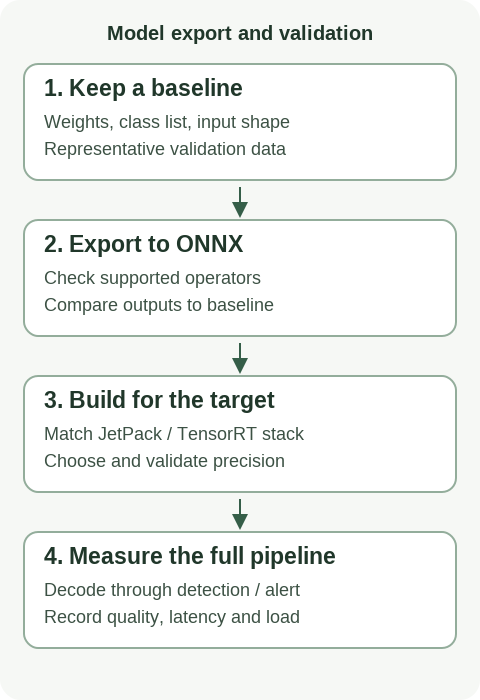
The pipeline has three steps: train or fine-tune in PyTorch, export the weights to ONNX, then build a TensorRT engine from the ONNX file on the target device. Keep the ONNX file under version control next to the class list and input size; it is the portable artefact everything else is derived from.
# 1. Export from PyTorch / Ultralytics to ONNX (on any machine)
yolo export model=best.pt format=onnx imgsz=640 opset=12 simplify=True

# 2. Build the engine ON THE JETSON from that ONNX file
trtexec --onnx=best.onnx \
        --saveEngine=best_fp16.engine \
        --fp16

# 3. Sanity-check load + timing before wiring it into the pipeline
trtexec --loadEngine=best_fp16.engineRun the same validation set through the ONNX model and the built engine and compare detections. If the two disagree noticeably, the problem is in the export or the build, and it is far cheaper to find it here than in the field.
TensorRT 11 uses strongly typed networks and removes the older model-wide precision flags and implicit INT8 calibration workflow. For that stack, prepare the model's types and explicit quantization first; do not copy the --fp16 or --int8 --calib commands below unchanged. See NVIDIA's 10-to-11 migration guide.
Precision: FP16 vs INT8
- FP16 is a candidate to compare against the FP32 baseline. The speed and accuracy change depend on the model and target hardware; this guide provides no measured multiplier or guarantee of an unchanged mAP.
- INT8 buys more speed but needs representative calibration data (a few hundred frames from your actual cameras), and accuracy can slide on classes that were already marginal. Measure per class, not just overall.
Why does INT8 need calibration data at all? Converting to 8-bit integers means choosing a numeric range for every layer's activations. TensorRT picks those ranges by running sample images through the network and observing the values. If the samples do not look like production — wrong lighting, wrong camera angle, no night footage — the ranges are wrong and accuracy suffers where you least expect it. Use frames from the real cameras, covering the conditions you will actually see, and never reuse the validation set for calibration or you will overstate the result.
# INT8 build with a calibration cache produced from representative frames
trtexec --onnx=best.onnx \
        --saveEngine=best_int8.engine \
        --int8 --fp16 \
--calib=calibration.cacheA sensible order of work: get FP16 working and validated first, measure, and only reach for INT8 if the measured frame rate is still short of the requirement.
What to benchmark, and how
Two numbers get confused constantly. Model-only latency is how long the engine takes to run one inference. End-to-end throughput is what the whole pipeline delivers per stream: decode, resize, inference, post-processing and the alert. The first is useful for comparing engines; only the second answers whether the deployment works.
- Warm up first. The first runs include allocation and clock ramp-up. Discard a batch of warm-up iterations before you start timing.
- Fix the power mode. Jetson devices can change clocks with power profile and temperature. Record the power mode and clock settings, and keep them identical between runs, or comparisons mean nothing.
- Report mean and p95. The mean hides stalls. A 95th-percentile latency tells you what the slow frames look like, which is what a real-time alert actually experiences.
- Use real footage and real stream counts. Benchmark with the cameras' resolution and codec, running all streams at once, for long enough to see thermal behaviour.
- Time each stage. Decode, pre-processing, inference, post-processing. The slowest stage is the one to optimise.
Benchmarking you can hand to a client
The deliverable is a table on the target hardware: stream count, frames per second per stream, end-to-end latency (camera to alert), and detection quality on your footage. The template below describes what to measure; it contains no results and does not establish performance on a specific edge device.
Device / power mode / TensorRT version:  ______
Model / input size / precision:          ______
Footage:                                 ______ (resolution, codec, duration)

| Streams | FPS per stream | Latency mean | Latency p95 | Quality vs FP32 baseline |
|---------|----------------|--------------|-------------|--------------------------|
|    1    |      ___       |     ___      |     ___     |   per-class mAP: ___     |
|    2    |      ___       |     ___      |     ___     |   per-class mAP: ___     |
|    4    |      ___       |     ___      |     ___     |   per-class mAP: ___     |

Stage breakdown (ms): decode ___ | pre ___ | inference ___ | post ___ | alert ___
Notes: thermal throttling observed? Y/N Warm-up runs discarded: ___Attach the exact commands and configuration used. A benchmark someone else can re-run is worth far more than a bigger number nobody can reproduce.
Common pitfalls
- Copying engines between devices. Engines are tied to the GPU and TensorRT version. After a JetPack or TensorRT upgrade, rebuild.
- Dynamic shapes by accident. Exporting with variable input sizes or batch dimensions makes the build and the tuning harder. Fix the input size and batch size you will deploy unless you have a reason not to.
- CPU-side pre- and post-processing. Resizing, colour conversion and non-maximum suppression in Python on the CPU can cost more than the inference. Profile before blaming the model.
- Unsupported operators. A custom layer or an exotic export setting can fail to convert or fall back to slower paths. Test the export on a small sample early.
- Benchmarking a cold, cool device. Short runs flatter the result. Run long enough to expose throttling, in an enclosure like the real one.
Limitations of this guide
It covers single-model detection pipelines. Multi-model graphs (detection + classification + tracking heuristics on-device), DLA offload, and dynamic shapes each need their own treatment.
Frequently asked questions
Which Jetson do I need?
Choose from measurements of your model, input size, codec, concurrent streams and latency target in the intended power mode. This guide has no device-specific benchmark that establishes a supported stream count for an Orin Nano or any other Jetson.
Can I just run the PyTorch model on the Jetson?
It can be a valid baseline or deployment if it meets your memory, latency and quality requirements. Profile the complete pipeline first; exporting to TensorRT is an optimization to measure, not a guarantee of better end-to-end throughput.
How do I update the model in the field?
Rebuild the engine from the new ONNX on the same device, verify against the validation set, then swap. Containerise the runtime so the device-side change is a deploy, not a surgery session over SSH.
Why can't I build the engine on my workstation and copy it over?
A TensorRT engine is tuned for a specific GPU architecture and TensorRT version, and the builder picks kernels by timing them on that hardware. An engine built elsewhere will usually fail to load or run poorly. Keep the ONNX file as the portable artefact and build the engine on the device.
Is INT8 worth the effort?
Sometimes. If FP16 already meets your stream count and frame rate, stay with FP16 and skip the calibration work. If you are short of headroom, INT8 is the next lever, but only with representative calibration frames and a per-class accuracy check against FP16.
Why is my end-to-end frame rate lower than the model benchmark?
The model is only one stage. Video decode, resizing, colour conversion, non-maximum suppression and drawing or alerting often run on the CPU and can dominate. Time each stage separately before optimising the network further.
Primary documentation
Use the documentation for the versions you deploy; the examples above are explanatory sketches, not a version-pinned application.
- Ultralytics: model export — Supported export formats and options.
- NVIDIA: engine compatibility — Platform, hardware and version compatibility limits.
- NVIDIA: quantized types — Version-specific precision and quantization workflows.
Model too slow for the edge device?
Tell me the device, the model and the frame rate you need.